Teneho's Calendar
A downloadable tool for Windows
Teneho's Calendar A downloadable tool for Windows
Name your own price
Tired of squinting at the tiny Windows system tray calendar?
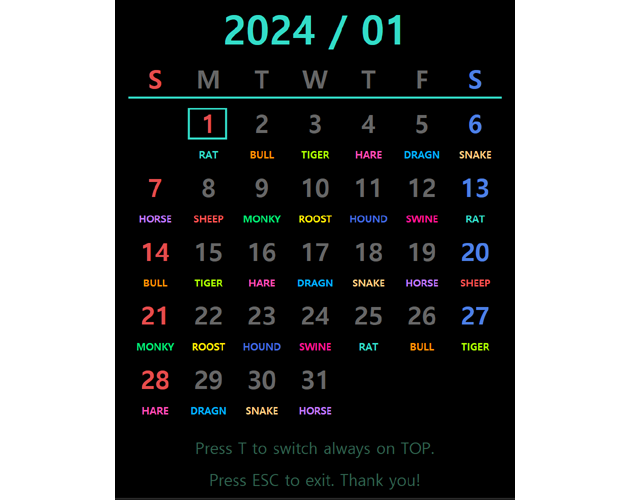
For users with high-resolution displays or multi-monitor setups, checking the date shouldn't mean staring at a tiny corner of the screen. Teneho's Calendar is a lightweight desktop calendar widget designed to provide clear visibility, flexible customization, and reliable offline support without consuming unnecessary system resources.
Built natively with pure C++ and Direct2D, it delivers smooth hardware-accelerated rendering with minimal overhead. No Electron, no unnecessary background processes—just a clean, responsive calendar that stays out of your way.
⚡ Features
• Large, Clear Display
A bold and freely scalable calendar designed for users who want something easier to read than the default Windows calendar.
• Lightweight Native Performance
Built with Win32/C++ and Direct2D hardware acceleration for excellent performance and extremely low resource usage, even during gaming or heavy workloads.
• Custom Pattern Engine
A Julian date-based engine for recurring schedules. The default configuration includes the traditional Oriental 12 Animal Signs, and patterns can be freely customized through the INI file.
• Global Holiday Engine (Smart Cache Mode)
Holiday data is synchronized automatically and stored locally in a compact .thd cache file. After the initial download, the calendar can continue displaying holiday information for roughly 10 years (about 5 years before and after the cached period), allowing it to remain useful even without an active internet connection.
• Ecosystem Docking (Master Control)
Seamlessly docks with Teneho's Watch through Windows message-based IPC. Once connected, the Calendar acts as the master, automatically synchronizing window position, Always-on-Top state, and zoom level.
• Smart Multi-Monitor & DPI Support
Detects individual monitor DPI settings and safely keeps windows within the active work area, preventing misplaced or "ghost" windows.
• Automatic Settings Save
Window position, Always-on-Top state, zoom level, and pattern settings are saved automatically in a compact INI file.
⌨️ Controls
• Right-Click or T
Toggle Always-on-Top.
• Arrow Keys
Navigate by month or year.
• Spacebar
Toggle Sunday/Monday start mode.
• Type 6 digits + Enter
Jump directly to a specific date (example: 202606).
• Ctrl + Mouse Wheel (or + / -)
Zoom in or out smoothly.
• Ctrl + 0
Reset zoom to the default size (1.0x).
• M
Minimize the window.
• ESC
Exit safely.
🛡️ Notice (Windows SmartScreen)
Teneho's Calendar is built entirely with native C++ and contains no malware, telemetry, or background data collection.
Because it is distributed by an independent developer without an expensive code-signing certificate, Windows Defender SmartScreen may display a warning the first time you launch the program.
If this happens, simply click:
"More Info" → "Run Anyway"
to start the application normally.
Thank you for supporting independent software development.
Purchase
In order to download this tool you must purchase it at or above the minimum price of $2.99 USD. You will get access to the following files:
Leave a comment
Log in with itch.io to leave a comment.